
Photo Slideshow Maker Platinum
- Software Features
- Flash Template Showcase
- Download Photo Slideshow Maker
- Flash Slideshow Solutions
- Free Web Album Service
- Flash Template Editor
- Create gift CD/DVD
- XML-driven Flash Gallery
- Support Services
- Frequently Asked Questions
- How to embed Flash to website
- Translate Photo Slideshow Maker
- Contact us
Flash Template Showcase
Embed Slideshow and YouTube Video in mySpace
MySpace is a popular social networking website offering an interactive, user-submitted network of friends, personal profiles, blogs, groups, photos, music and videos for teenagers and adults internationally. Slideshows and YouTube videos can be embedded as personal profiles or embedded in mySpace blog by pasting the embed code.
Photo Slideshow Maker Pro can create stunning slideshows with basic and advanced themes. And both the slideshows created with basic and advanced themes can be embedded in mySpace with a few clicks. Before you embed the slideshow in mySpace, you need to upload the slideshow to go2ablum. You need to sign up an account of go2ablum at first, it’s free. Please visit http://www.go2album.com.
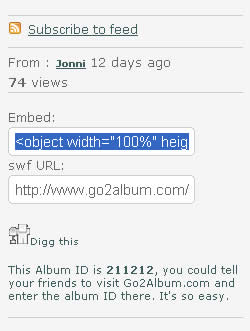
When you publish the slideshow, please select Create flash files and upload to go2ablum. After you uploaded the slideshow successfully, you will be led to the slideshow page automatically. In the opened page, copy the the embed code of the slideshow.
If you want to embed a YouTube video, just do it in the same way.
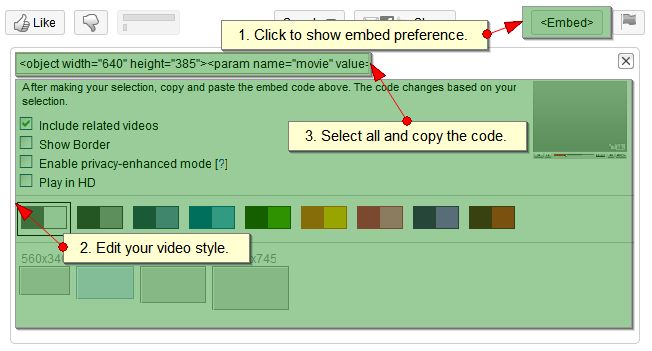
Step 1 - Copy the code from the box above.
Step 2 - On your MySpace, click Edit Profile from the Profile dropdown.
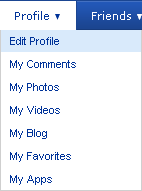
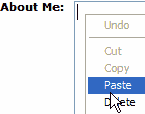
Step 3 - Paste the code into one of the boxes such as About Me, I'd like to meet, Interests, etc. (Right-click in the About Me box, and choose "Paste", or just Ctrl-V)
Step 4 - Scroll to the top of the page and press Save All Changes, and you are done!