

Photo Slideshow Maker Platinum
- Software Features
- Flash Template Showcase
- Download Photo Slideshow Maker
- Flash Slideshow Solutions
- Free Web Album Service
- Flash Template Editor
- Create gift CD/DVD
- XML-driven Flash Gallery
- Support Services
- Frequently Asked Questions
- How to embed Flash to website
- Translate Photo Slideshow Maker
- Contact us
Flash Template Showcase

Go2Album - Free Web Album Service

Go2Album is a free online photo gallery dedicated to Photo Slideshow Maker users.
Photo Slideshow Maker helps you create gorgeous photo flash slideshows with music and transition effects, and lots of beautifully-designed flash templates.
You can publish the photo slideshows to our free web album hosting service Go2Album. After uploading the Flash slideshow to Go2Album, you can then easily embed it to other websites.
What's more, you can then embed the uploaded Flash slideshow to MySpace, Blogger, Live Space, WordPress, LiveJournal, and all social websites and blogs that support editing HTML code.
Small business can even utilize Photo Slideshow Maker and Go2Album to better showcase products in eBay, by demonstrating item descriptions with flash slideshows. Learn more about eBay Solution
To create photo slideshows that can be upload to Go2Album, you need to download and install Photo Slideshow Maker.

To publish PFM-created slideshows to Go2Album, you need to sign up for Go2Album service.
Flash albums in Go2Album can be embedded to the following websites/blogs
Easy Way to Embed Flash Slideshow to Website
If you don't want to upload slideshow files to Web server, or have difficult in handling the file path, you can simply upload the Flash slideshow to our free web album service Go2Album, and then get the HTML code to embed to your webpage.
Step 1: Sign up for Go2Album
Go to www.go2album.com and sign up for the free service.
Step 2: Sign into Go2Album
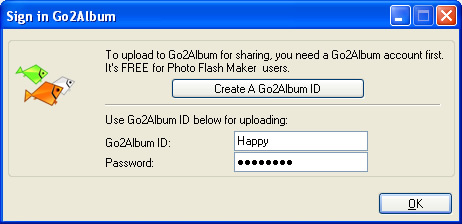
Open the Photo Slideshow Maker program, click the menu "Preference", and click the "Sign in Go2Album" item, enter your user name and password, click "OK" to save the setting.
Step 3: Upload Flash slideshow to Go2Album
When you proceed to the last step of creating slideshow with Photo Slideshow Maker, select the "Create Flash File and Upload to Go2Album", and the Flash slideshow will automatically uploaded to Go2Album.
The program will prompt you to the webpage where the Flash slideshow displays.
Step 4: Copy the HTML Code of the Flash Slideshow
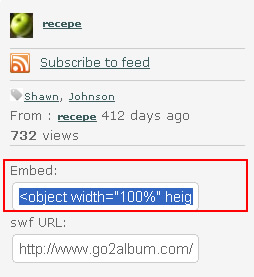
On the right sidebar of the web album page, you will see the embed code. Select and copy the HTML code.
Step 5: Embed HTML code to designated webpage
Now you get the source code. Just open the webpage, and paste the code to where you want to display the Flash slideshow. You can insert your flash slideshow to eBay as product descriptions, or to Social Networks such as MySpace, WordPress, Blogger, hi5, iGoogle, myYearbook and so on.
 Download FREE trial of Photo Slideshow Maker to make flash slideshow
 Buy Photo Slideshow Maker to make flash slideshow without limitations