

Photo Slideshow Maker Platinum
- Software Features
- Flash Template Showcase
- Download Photo Slideshow Maker
- Flash Slideshow Solutions
- Free Web Album Service
- Flash Template Editor
- Create gift CD/DVD
- XML-driven Flash Gallery
- Support Services
- Frequently Asked Questions
- How to embed Flash to website
- Translate Photo Slideshow Maker
- Contact us
Flash Template Showcase
Embed slideshow and YouTube video in eBay
eBay Inc. is an American Internet company that manages eBay.com, an online auction and shopping website in which people and businesses buy and sell a broad variety of goods and services worldwide. The majority of the sales take place through a set-time auction format, but subsequent methods include a substantial segment of listings in the "Buy It Now" category. In addition to its original U.S. website, eBay has established localized websites in thirty other countries. eBay Inc. also owns PayPal, StubHub, Kijiji, and other businesses.
Photo Slideshow Maker Pro can create stunning slideshows with basic and advanced themes. And both the slideshows created with basic and advanced themes can be embedded in eBay. Before you embed the slideshow in eBay, you need to upload the slideshow to go2ablum. You need to sign up an account of go2ablum at first, it’s free. Please visit http://www.go2album.com.
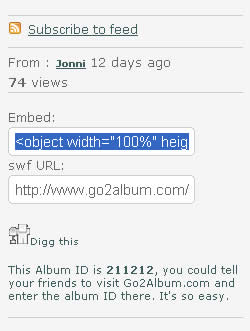
When you publish the slideshow, please select Create flash files and upload to go2ablum. After you uploaded the slideshow successfully, you will be led to the slideshow page automatically. In the opened page, copy the the embed code of the slideshow.
If you want to embed a YouTube video, just do it in the same way.
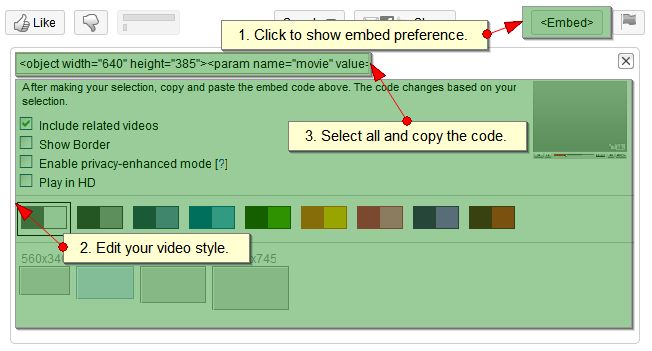
Step 1 - Copy the code as mentioned above.
Step 2 - On your ebay listing creation, click on the HTML tab
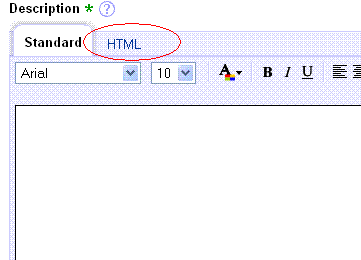
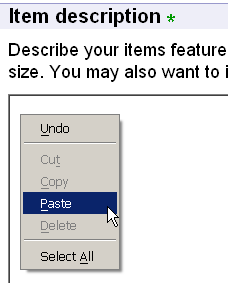
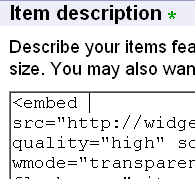
Step 3 - Paste the code in to the Item Description box (Right-click in the box and choose "Paste" or just hit Ctrl+V).
Step 4. Click on the Preview Description link to verify that it show up correctly.