

Support & FAQs
How to edit photos for a perfect photo flash gallery
Making photos into flash gallery for sharing online widely is really a fantastic experience for us digital life lovers. To make the photos more beautiful and more fit for our different needs on the output flash gallery, Photo Slideshow Maker Platinum provides abundant photo editing functions.
 FREE download Photo Slideshow Maker to make flash slideshow
You may enter the Edit Photo window to edit photos in Photo Slideshow Maker Platinum in the following 3 ways:
a. Click the menu Photo > Edit Photos.
b. Right click an image in the region of selected photos, then choose Edit Photos.
c. Click the Edit buttons in the toolbar above the selected photos.
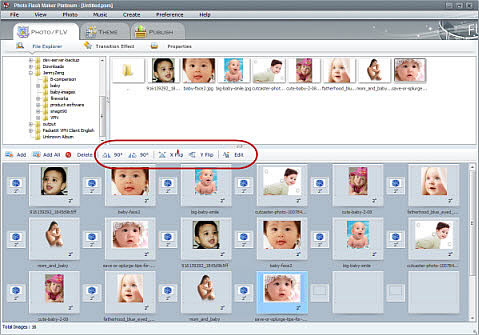
After you enter the Edit Photo window, you can flip photos, add info to the photos, such as title, link, description, etc. add text in different font and colors, add artclips, crop and filter effects, and so on.
1. Flip/rotate photos
Rotate/flip images by 90 / 180 degrees, clockwise or anti-clockwise.
By 4 flipping options, Photo Slideshow Maker Platinum enables you to easily flip any photo, picture or image right to left, bottom to top and upper left to bottom right in mirror. Just tick the flipping methods you want.
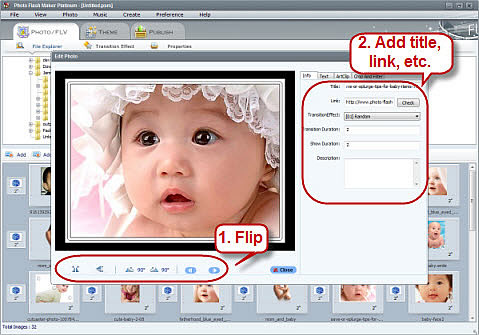
2. Add info
You can add almost any suplimentary info to your photo, such as title, hyperlink, transition effect, description, set the transition duration, photo show duration, etc.
3. Add text
100+ text font for you to choose;
Different colors and artword forms for you to decorate your text;
The choice to add selected text to all.
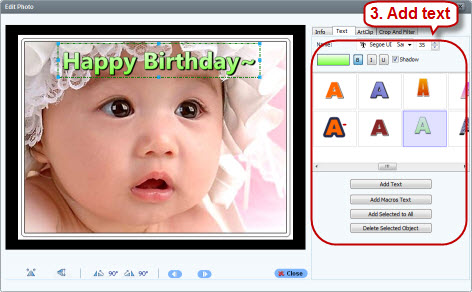
4. Clip art
Hundreds of art clip effects are provided for you to add to your photos in different columns: Favorite, General, Bubbles, Frame, Heart, Baby, Chrisrmas, etc.
You can choose the art clip you like, as well as changing the size of it to fit for your photos.
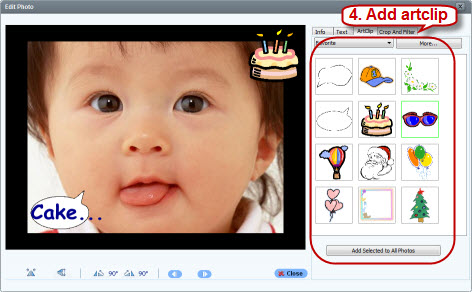
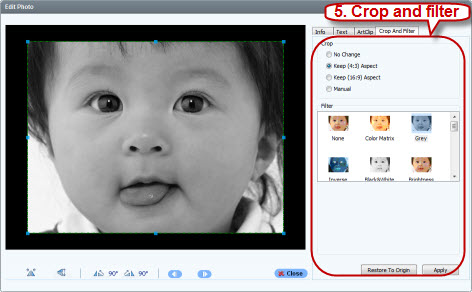
5. Crop and Filter
You can also crop the photo sizes for better fitness into your flash template or album theme. You can choose to keep 4:3 aspect; keep 16:9 aspect, or manually change photo size to fit your flash or for other effects.
Filter effects is the most funny part of Edit Photo functions. Here you can set the following filter effects:
Color Matrix, Gray, Inverse, Black & white, Carve, Embossment, 3D Grid, Pinch, Punch, Red Eye Removal, etc. which make your photos much more attractive than the original and with all kinds of visional enjoyment.
From the above information, we can see that Photo Slideshow Maker Platinum provides such extraordinary photo editing functions that it is really a best choice to edit photos and create a fantastic photo slideshow.
Now you may just free download Photo Slideshow Maker Platinum for a try.
Key Features of Photo Slideshow Maker Platinum:
- Support adding photos, FLV videos & music
- Support editing photos: clip photos, add info(title, hyperlinks, description,etc.), add text, add artclip, crop and filter, etc.
- Apply with numerous transitions & effects
- Provides hundreds of amazing templates devided in 5 categories including video templates suitable for making photo gallery
- Support adding hyperlink to videos & photos
- Output standalone & XML-driven photo gallery and burn to auto-run CD/DVD
- Upload photo video gallery to Go2Album, social websites and your own website
- And more...
Download FREE trial of Photo Slideshow Maker to make flash slideshow
 Buy Photo Slideshow Maker to make flash slideshow without limitations