

Photo Slideshow Maker Platinum
- Software Features
- Flash Template Showcase
- Download Photo Slideshow Maker
- Flash Slideshow Solutions
- Free Web Album Service
- Flash Template Editor
- Create gift CD/DVD
- XML-driven Flash Gallery
- Support Services
- Frequently Asked Questions
- How to embed Flash to website
- Translate Photo Slideshow Maker
- Contact us
Flash Template Showcase
Translate Photo Slideshow Maker Free to your language
[Help us translate and get FREE license of Photo Slideshow Maker Platinum. ]
Currently, Photo Slideshow Maker Free version is available in English, Japanese, German, Spanish, French, Italian, Portuguese, Hungarian, Swedish, Bulgarian, Thai, Arabic, Traditional Chinese and Simplified Chinese.


Any optimization or suggestion related to the above language files are welcome to send us. Meantime, there are still great demands on the language versions below:
Afrikaans, Albanian, Amharic, Asturian, Azerbaijani, Bengali, Bosnian, Brazilian Portuguese, Catalan, Croatian, Czech, Danish, Dutch, Estonian, Filipino, Finnish, Greek, Hebrew, Hindi, Hungarian, Indonesian, Irish Gaelic, Lithuanian, Macedonian, Malay, Marathi, Norwegian, Persian, Polish, Punjabi, Romanian, Russian, Sabah, Serbian, Serbian Latin, Slovakian, Slovenian, Turkish, Ukrainian, Urdu, Vietnamese, or other languages.
You can help us translate Photo Slideshow Maker Free to any target language that you are specialized in. All the strings which need to be translated are embedded in the English language file (lang_eng.ini).
We will acknowledge all volunteers who make contributes to the translation of Photo Slideshow Maker Free, or Photo Slideshow Maker Platinum in our websites, as well as in the INI file, so that every user all over the world who use this program can know and thank your great contribution. What's more, you can also get a FREE license of Photo Slideshow Maker Platinum.
Software translation is quite easy. For instance, if you volunteer to translate the English version to Norwegian version, just follow these steps:
Step 1. Find the INI file
The INI file format is a de facto standard for configuration files. The language configuration of Photo Slideshow Maker Free is stored in the INI files.
Go to the program files folder of Photo Slideshow Maker Free(the path could be X:\Program Files\Photo Slideshow Maker Free Version, X stands for the hard disk drive letter such as C, D, E, etc.)
Note: If you want to translate the Photo Slideshow Maker Platinum, go to the program folder like X:\Program Files\Photo Slideshow Maker Platinum.
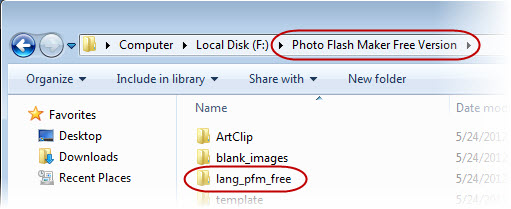
Open the "lang_pfm_free" sub-folder , and you will see the INI files and the corresponding file folder.
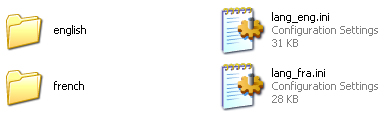
Use the English Language file - the "lang_eng.ini", to translate for your country language.
You can also direct download the "lang_eng.ini" file below.
Download the English languase file for translation (.zip file)
Step 2. Create an INI file named "lang_nor.ini"
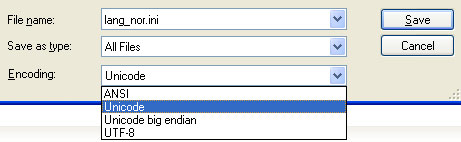
Open the "lang_eng.ini" file, and then save it as "lang_nor.ini".
Please save the text file with Unicode Encoding, since Photo Slideshow Maker Free is complied with Unicode encoding.
You can edit the general information of the new version that you are going to work at. In the General section of the INI file, you can tell people which version of the Photo Slideshow Maker Free program is being used in your translation, the language, and your name, and your email, if you wish to be contacted by people who are interesting in your translation.
[General]
version=5.46
language=Norwegian
translator=Your name
Email=your_email@example.com
...
Save the changes, and then restart Photo Slideshow Maker Free, you should see the Norweigian language option appears in the menu of the program Preference > Language.
Step 3. Translate the INI file
INI files are simple text files with a basic structure. The basic element contained in an INI file is the parameter. Every parameter has a name and a value, delimited by an equals sign (=). The name appears to the left of the equals sign.
name = value
Parameters may be grouped into arbitrarily named sections. The section name appears on a line by itself, in square brackets ([ and ]). All parameters after the section declaration are associated with that section. For example:
[STRING]
101 =&About AnvSoft Photo Slideshow Maker...
102 =Total Images : %d
105 =Uploading file %d of %d : %s
You only need to translate the values after the equals sign (=). Please keep the section name and the ID unchanged. There are some words that is used for programming language and don't need to be translated. such as %d, %s, \t, \n, %d
During the translating, you can restart the Photo Slideshow Maker program and switch the language option to see if your translation works.
Step 4. Send us translated files and Get Rewarded
When you complete the translation, you can email the documents to us at support@photo-flash-maker.com
We will acknowledge all volunteers who make contributes to the translation of Photo Slideshow Maker in our websites, as well as in the INI file. And we will present a license Photo Slideshow Maker Platinum full version to each translator.
Any question about the translation project, please feel free to contact us.
Photo Slideshow Maker Translator Acknowledgement
The following translators/developers had contributed in translating the respective version of the Photo Slideshow Maker. Hereby we thank them for their contributions. We also appreciate any further translation which is not up-to-date.
English version, up to date, by AnvSoft INC.
French version, up to date, by GraficLand, Felix
German version, up to date, by Susanne, Doris
Italian version, up to V4.61, by Franz Sommeregger
Portuguese version, up to V4.74, by Miguelc Ferreira
Spanish version, up to V4.61, by Raul Diaz Solis (Peky)
Hungarian version, up to V5.07, by Hegedüs Gábor
Swedish version, up to V5.12, by Per-Ola Johansson
Turkish version, up to V5.07, by Ali Sarıoğlu
Thai version, up to V4.84, by Sri Thammaraj
Japanese version, up to date, by Kevin Lee
Chinese versions, up to date, by Henry Lan